
Let Customers Try Furniture at Home—Before They Buy: AR, VR & AI

Watch the idea in action: VYAPARI UPGRADE
Watch the furniture business upgrade explained by Harshvardhan Purohit on Instagram, then explore the full guide below.
VYAPARI UPGRADE | SIN Technologies
You sell furniture worth lakhs. But can your customer see how it will look in their home before they buy?
Your furniture carries more than wood, fabric and a price tag. It carries the patience of your craftspeople, the detail of a carving and years of skill. Yet, on a customer's phone, all that work often becomes two or three photos and a message: “Please send the price.”
Photos still matter. But they cannot answer every buying question: Will this sofa overwhelm my living room? What does the back look like? Will the finish work with my existing furniture?
AR furniture visualization, a 3D furniture catalogue and a virtual showroom can help customers explore those questions. Behind the scenes, a connected dashboard and AI-assisted workflows can help your team manage the enquiry that follows.
1. A 3D furniture catalogue lets craftsmanship do the talking

A 360-degree product viewer allows shoppers to rotate a digital furniture model, inspect its shape and zoom into details captured in the model. For a carved chair, that might mean examining the armrest, legs and back instead of relying on one flattering front photograph.
A useful digital furniture catalogue brings the visual and practical information together:
Product dimensions, materials and available finishes.
Clear front, side and rear views, with detailed photography alongside the model.
Upholstery or colour options that correspond to real, available variants.
An obvious enquiry button tied to the exact product being viewed.
There is an important quality check: a 3D model only shows what has been captured accurately. It cannot prove wood quality, structural strength or seating comfort. Keep honest specifications, close-up photos and physical samples in the buying journey.
2. AR furniture visualization brings the sofa into their room

Augmented reality, or AR, overlays a digital object onto a view of the real world. In a furniture-shopping experience, the customer uses a compatible phone to preview a sofa, table or chair in their own space.
Imagine a family choosing a sofa. Instead of repeatedly asking for more pictures, they open the product, launch the room preview and explore its position beside their existing coffee table. That gives the next conversation a better starting point: “We like this design. Which fabric options are available?”
The idea is already used in retail. IKEA's planning tools include room-design experiences, while Shopify describes furniture AR as a way to view product models in a customer's space. These are industry examples, not claims of a partnership with SIN Technologies.
AR helps people visualize; it is not a substitute for measuring. Model scale, camera tracking, device support and room lighting affect the experience. Customers should still confirm furniture dimensions, door widths, stair access and delivery clearances. On-screen colours and finishes can also differ from the actual product.
3. A virtual furniture showroom reaches customers beyond your store
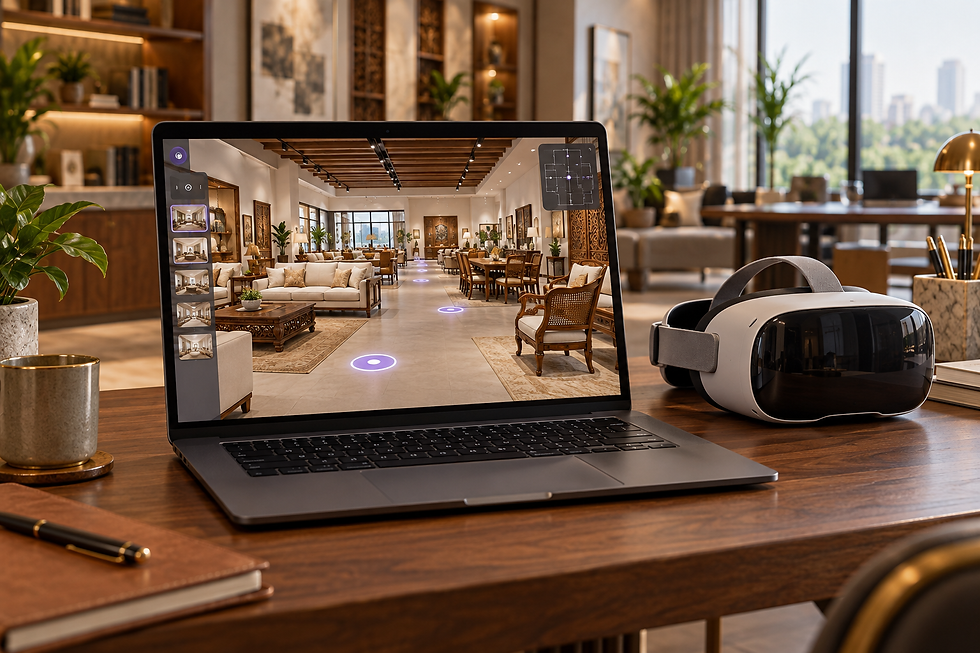
A virtual furniture showroom lets customers explore collections remotely. You could group products into living-room, dining-room and bedroom settings, then connect each featured item to its specifications and enquiry form.
For a manufacturer or showroom serving buyers outside its city, this can make an initial conversation more useful. A remote buyer can shortlist designs before arranging a visit or requesting a quotation.
Choose the experience to suit the audience. A browser-based 360-degree tour can work on a phone or laptop; an immersive VR experience may use a headset. They are different formats, and a headset should not become a barrier for customers who simply want to browse.
Start with a clear collection and easy navigation. An impressive digital room is of little use if the customer cannot identify a product or contact your team.
4. One dashboard for enquiries, orders, stock and payment follow-ups

Better product discovery is only half the upgrade. Your team also needs to know what happened after the customer clicked “Enquire.”
A furniture business management dashboard can bring together:
Enquiries: customer requirements, product interest, assigned salesperson and next follow-up.
Orders: quotation status, approved specifications, production progress and delivery dates.
Inventory: available pieces, reserved stock, finish variants and items made to order.
Payments: recorded advances, outstanding balances, due dates and reconciliation status.
For custom furniture, ready stock and made-to-order capacity should be tracked separately. A dashboard should not promise immediate availability for a piece that still needs manufacturing.
The dashboard is only as reliable as its source data. Connect the relevant systems or define who updates each record. Payment status should come from verified records or a configured integration, not an AI guess.
5. AI automation can reduce repetitive sales work

Sending a catalogue, recording an enquiry and reminding a salesperson to follow up are repeatable tasks. Some need straightforward automation; AI can help where messages need interpretation or summarising.
Consider this proposed workflow:
A customer asks about a six-seater dining set through your website or a supported messaging channel.
The system records the enquiry and captures requirements such as size, finish, budget and location.
It shares an approved catalogue or product link using your configured messaging rules.
A salesperson receives a summary and a follow-up reminder.
The team confirms pricing, availability and delivery before issuing a final quotation.
Keep people responsible for custom specifications, discounts, complaints and commitments. Automation should use approved product information and respect customer consent and channel rules. If WhatsApp is part of the setup, integration requirements, messaging permissions and any platform charges need to be assessed.
This is how furniture enquiry management becomes more consistent without pretending that every business decision can run unattended.
Where should a furniture business start?
Start with the problem costing your team the most time or losing the most useful enquiries.
Customers struggle to imagine the product: pilot 3D views and AR for a small selection of popular items.
Remote customers cannot explore the range: consider a simple virtual showroom linked to product details.
Enquiries get lost between staff: fix lead capture, ownership and reminders first.
Stock or outstanding-payment information is scattered: establish reliable records and a shared dashboard.
For an initial pilot, choose five to ten suitable products, gather accurate measurements and photography, and define one enquiry-to-follow-up workflow. Test it on the phones your customers actually use before expanding the catalogue.
Measure product-viewer usage, qualified enquiries, response time, quotation-to-order conversion and staff time spent on repeated tasks. Compare results over a suitable period; do not assume that adding AR or AI automatically increases sales.
Frequently asked questions
Can customers see furniture in their home before buying?
Yes, a supported AR experience can place a digital furniture model into a camera view of their room. Accurate models and compatible devices are essential. Always confirm physical measurements before ordering.
Is a 360-degree furniture image the same as AR?
No. A 360-degree spin or 3D viewer helps customers inspect an item from different angles. AR adds a room-placement experience. A rotating photo sequence alone does not provide a usable AR model.
Do customers need a VR headset?
Not for a standard browser-based virtual tour or supported phone-based AR. A headset is relevant when you choose to offer an immersive VR version.
How much does an AR furniture catalogue cost?
Cost depends on the number and complexity of products, whether usable 3D models already exist, required variants, hosting and integrations. Request a scoped quotation that separates initial creation from ongoing maintenance and platform fees.
Can AI manage all customer conversations automatically?
It can assist with approved answers, catalogue sharing, enquiry capture and reminders. Your team should handle uncertain answers, bespoke requests, final commitments and exceptions.
Upgrade the buying experience—and the work behind it

Your craftsmanship deserves to be seen clearly. Your team deserves a better way to manage the interest it creates.
VYAPARI UPGRADE is presented by Harshvardhan Purohit, Founder & CEO of SIN Technologies, to explore practical ways businesses can use technology. For a furniture retailer, manufacturer or showroom owner, the right starting point is a focused assessment of your catalogue, sales process and existing systems.
Tell us your product range, catalogue size and the task you want to improve first. The scope and feasibility of AR, VR, dashboards and automation depend on that assessment.
Want to explore the idea? Watch the reel and comment “FURNITURE” on Instagram.
The five accompanying AI-generated visuals illustrate possible experiences. They are not photographs of client installations or screenshots of a deployed SIN Technologies product.


Comments